The Birthday Attacks against Transport Layer Security (TLS) Ciphers vulnerability is a common one I find when conducting Cyber Essentials Plus Audits, it often stumps people on how to fix it, so I’ve put this guide together to explain why and show how easy it is to fix.
Whilst this talks about using Intune, in practice you could use the PowerShell script in part B below and either run it manually or use your favourite tool to deploy it.
WARNING!
Use at your own risk!
This is how I have fixed the issue on my own devices, there may be a better way to fix this for your own environment.
This is designed for Competent IT People to use as a reference and NOT for an IT novice to blindly follow!
Please Test before you use it in anger!
So, the actual fix is to disable the weak ciphers using a power shell command. ‘Disable-TLSCipher -Name <NAME>’ Reading the articles below also suggests you can use SchUseStrongCrypto in a registry key, but I could not find a specific powershell command to apply that. I would rather use a command to enable/disable a feature rather than edit the registry directly, hence why I chose this route.
https://learn.microsoft.com/en-gb/windows/win32/secauthn/tls-cipher-suites-in-windows-10-v22h2
https://learn.microsoft.com/en-us/mem/configmgr/core/plan-design/security/enable-tls-1-2-server
https://learn.microsoft.com/en-us/answers/questions/1351265/how-do-i-fix-cve-2016-2183
First off, you can verify if you do have any vulnerable ciphers by simply using the following command in Power Shell on the machine you’re testing
Get-TLSCiper <Name>
The Three Ciphers to Check for are:
Now wait a little while for it to start to push out (it can take some time, I wrote this article whilst waiting for it! Still wasnt done, so I rebooted… now it’s done!)
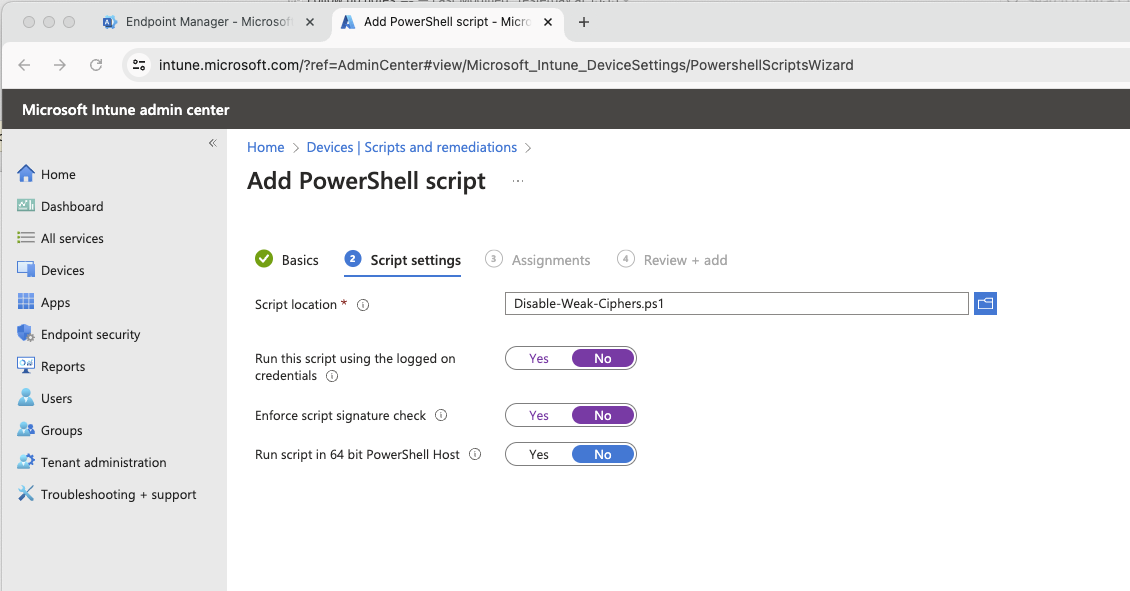
Once Done you can check on one of your test machines it’s worked by running the power shell command ‘Get-TLSCipher -Name DES’ You should not get any results if it’s successful… – It’s also worth checking in Endpoint Manager > Devices > Scripts > Disable Weak Ciphers > Overview to check it’s deployed OK.
I figured it was safer for you to copy and past in to a new PowerShell file, rather than download a file from my website. So here’ s the file in full, please read and understand it 🙂
## PowerShell Script to address Weak TLS Ciphers (Birthday Attack against TLS Ciphers)
# Copied from reply by Karol Kula on post: https://learn.microsoft.com/en-us/answers/questions/486172/birthday-attacks-against-tls-ciphers-with-64bit-(s
# This Script put together by Chris Blunt - Blunt Security July 2024
# Use at your own risk!
##
## Please See the following Blog Post for further info about how to use this in Intune
## https://bluntsecurity-uk.jwhoststaging.co.uk/msp-articles/fixing-win-verify-trust-with-intune/
#
## The following MS Articles & Forums has been used as reference material
## https://learn.microsoft.com/en-gb/windows/win32/secauthn/tls-cipher-suites-in-windows-10-v22h2
## https://learn.microsoft.com/en-us/mem/configmgr/core/plan-design/security/enable-tls-1-2-server
## https://learn.microsoft.com/en-us/answers/questions/1351265/how-do-i-fix-cve-2016-2183
## https://learn.microsoft.com/en-us/answers/questions/486172/birthday-attacks-against-tls-ciphers-with-64bit-(son
#

$WeakCipherSuites = @(
    "DES",
    "IDEA",
    "RC"
)

Foreach($WeakCipherSuite in $WeakCipherSuites){
    $CipherSuites = Get-TlsCipherSuite -Name $WeakCipherSuite

if($CipherSuites){
        Foreach($CipherSuite in $CipherSuites){
            Disable-TlsCipherSuite -Name $($CipherSuite.Name)
        }
    }
} If you want some straight talking help with Cyber Essentials or a wider Cyber Security matter Book a discovery call with me today.
Cyber Essentials is designed to be easy and cost effective for Small organisations to achieve, in fact often it’s the larger organisations which struggle more as they have more complex systems which need additional work to meet the minimum requirements set out by the UK Government. The framework and question set is available free to any organisation so there is a very low barrier to entry, you just need to spend a little bit of time reading about it!